Freelancers handle large amounts of client information every day including contracts project files invoices marketing materials and confidential business data. Storing client files securely online has become one of the most important responsibilities for freelancers working in the digital economy. Clients trust freelancers with sensitive information and protecting that data is essential for maintaining professionalism and long term business relationships.
Secure online file storage allows freelancers to organize projects collaborate with clients and access documents from anywhere. However many freelancers make the mistake of storing files without proper security protection. Weak storage systems can expose client information to cyber threats accidental data loss or unauthorized access. Understanding how freelancers store client files securely online helps freelancers protect client privacy improve workflow organization and build trust with business partners
Why Secure File Storage Is Important for Freelancers
Freelancers work with various types of confidential data such as brand designs marketing strategies contracts and financial documents. Losing or exposing this information can damage client relationships and freelance reputation. Clients often prefer working with freelancers who follow professional data protection practices.
Secure file storage helps freelancers maintain organized workflows. When files are stored in structured folders freelancers can quickly access project materials without wasting time searching through emails or local storage systems. Organized storage also improves collaboration because clients can easily review shared files.
Another important advantage of secure storage is protection against data loss. Computer failures accidental file deletion or device theft can permanently destroy project files if backups are not available. Cloud storage platforms provide automatic backups that reduce the risk of losing important documents.
Best Cloud Storage Platforms Freelancers Use
Many freelancers rely on cloud storage software to store client files safely while maintaining easy accessibility. Choosing reliable storage platforms is essential for protecting sensitive client information.
Google Drive
Google Drive is widely used by freelancers because it offers strong file organization tools and secure sharing features. Freelancers can create client specific folders store project files and share documents with permission control. Google Drive also integrates with productivity tools like Google Docs and Google Sheets which helps freelancers collaborate with clients in real time.
Dropbox
Dropbox provides advanced file synchronization and strong security protection. Freelancers often use Dropbox for storing design files video projects and large client documents. Dropbox includes file recovery features that allow freelancers to restore deleted or previous versions of files.
OneDrive
Microsoft OneDrive is popular among freelancers who work with Microsoft Office tools. OneDrive provides automatic backup options and strong encryption that protects client documents from unauthorized access.
pCloud and Sync
pCloud and Sync offer privacy focused storage solutions with strong encryption features. Freelancers who handle highly sensitive client information often choose these platforms because they provide additional security protection.

Organizing Client Files Using Structured Folder Systems
Freelancers who manage multiple clients benefit from creating structured folder systems. Organized storage systems allow freelancers to quickly locate files and maintain project workflow efficiency.
Freelancers should create separate folders for each client. Inside each client folder freelancers can create subfolders for contracts project drafts final deliverables invoices and communication documents. This structure prevents files from becoming mixed and improves workflow clarity.
Using consistent naming conventions is also important. Freelancers should include project names dates and version numbers in file names. Consistent naming helps freelancers track file progress and locate documents easily.
Version control prevents freelancers from losing previous project drafts. Instead of replacing files freelancers should save updated versions with new version labels. Version tracking helps freelancers recover previous drafts if clients request revisions.
Setting File Access Permissions for Client Security
Secure file storage requires controlling who can view or edit client documents. Cloud storage platforms provide permission settings that allow freelancers to restrict file access.
Freelancers should share files using view only permissions when clients only need to review content. Editing permissions should only be granted when clients need to make changes or provide feedback. Restricting permissions reduces the risk of accidental file modification or deletion.
Freelancers should avoid sharing files using public links. Public file links increase the risk of unauthorized access. Instead freelancers should use private sharing options that require client email verification.
Password protected files add another layer of security. Freelancers working with financial or legal documents should consider password protection before sharing sensitive files.
Using Encryption to Protect Client Files
Encryption converts data into secure code that prevents unauthorized users from reading files. Many cloud storage platforms provide built in encryption that protects client data during file transfer and storage.
Freelancers working with confidential business information should choose storage providers that offer end to end encryption. End to end encryption ensures that only authorized users can access stored files.
Using encrypted file storage protects freelancers from cyber attacks and data theft. Encryption also improves freelancer credibility because clients value strong data security practices.
Creating Backup Systems for Client Files
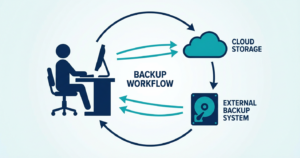
Freelancers should never rely on a single storage system. Creating backup systems ensures that client files remain safe even if cloud services experience technical issues.
Freelancers can use multi location backup strategies by storing files in cloud storage and external hard drives. Backup scheduling tools allow freelancers to automatically copy files to secondary storage locations.
Freelancers should regularly test backup files to confirm that stored data can be recovered successfully. Backup verification helps freelancers avoid data loss emergencies.
Secure File Sharing Strategies for Freelancers
Freelancers often need to share files with clients for feedback or final delivery. Secure file sharing methods protect client privacy and prevent unauthorized downloads.
Freelancers should use temporary sharing links when delivering project files. Temporary links automatically expire which reduces long term security risks. File sharing platforms also allow freelancers to track file downloads and monitor client access.
Large file delivery tools help freelancers send video files design projects and marketing materials securely. Secure file transfer services provide password protection and encrypted file delivery options.
Common Mistakes Freelancers Make When Storing Client Files
Many freelancers store client files on personal devices without backup protection. Local storage systems increase the risk of permanent data loss. Freelancers should always use cloud storage combined with backup systems.
Another mistake involves using weak passwords for storage platforms. Weak passwords increase the risk of hacking attempts. Freelancers should use strong passwords combined with two factor authentication.
Sharing files through unsecured communication platforms is another risk. Freelancers should avoid sending sensitive files through public messaging apps without encryption protection.
Ignoring file organization can also reduce productivity. Freelancers who store files randomly often waste time searching for documents and may accidentally share incorrect files with clients.
How Secure File Storage Improves Freelance Productivity
Secure storage systems improve freelancer productivity by reducing file searching time and preventing workflow interruptions. Organized storage allows freelancers to quickly locate project resources and focus on completing tasks.
Clients feel more confident working with freelancers who follow secure storage practices. Professional data protection increases client trust and improves chances of long term collaboration.
Secure storage also supports remote work flexibility. Freelancers can access files from multiple devices and work locations without risking data loss.
Connecting Secure File Storage With Freelance Workflow Systems
Secure file storage works best when combined with project management tools invoicing software and communication platforms. Freelancers who integrate storage systems with workflow tools can manage projects more efficiently.
For example freelancers can link project management dashboards with cloud storage folders. This allows freelancers to access project files directly from workflow platforms. Combining storage with invoicing tools also helps freelancers store financial records securely.
Freelancers who build integrated workflow systems reduce manual work and improve project delivery speed. Organized storage becomes the foundation of a scalable freelance business.
Conclusion
Storing client files securely online is essential for freelancers who want to maintain professionalism protect sensitive data and improve workflow efficiency. Cloud storage platforms encryption tools backup systems and structured folder organization help freelancers manage client files safely. Freelancers who follow strong security practices build client trust reduce data loss risks and improve productivity. Secure file storage is not only a safety measure but also a strategic business advantage that supports long term freelance success
FAQ Section Featured Snippet Target
Frequently Asked Questions
How do freelancers store client files securely online
Freelancers store client files securely online using encrypted cloud storage platforms strong password protection access control permissions and automatic backup systems that protect sensitive client data.
What is the safest cloud storage for freelancers
Google Drive Dropbox Sync and pCloud are popular cloud storage platforms that provide encryption secure file sharing and data backup features for freelancers.
Should freelancers backup client files
Yes freelancers should always create backup copies of client files using cloud storage and external storage systems to prevent data loss from device failure or cyber threats.
How can freelancers share files securely with clients
Freelancers can share files securely using private sharing links password protected downloads temporary file access and encrypted file transfer services.
Why is file security important for freelancers
File security protects confidential client data builds professional credibility and prevents legal or financial risks caused by data breaches.