Google Drive vs Dropbox for Freelancers: Which Cloud Storage Is Better?
Freelancers today depend heavily on cloud storage services to store, organize, and share files with clients around the world. Whether you are a graphic designer, videographer, writer, or developer, having reliable cloud storage is essential for productivity and workflow management. Two of the most popular cloud storage platforms are Google Drive and Dropbox. Both services offer strong features, but they differ in pricing, storage capacity, collaboration tools, and ease of use.
In this detailed comparison, we will explore Google Drive vs Dropbox for freelancers, helping you decide which platform best suits your professional needs.
Why Freelancers Need Cloud Storage
Before comparing these two platforms, it is important to understand why cloud storage matters for freelancers.
Freelancers often work remotely and collaborate with clients from different locations. Cloud storage allows you to safely store your work files, access them from any device, and share them instantly. It also protects important data from loss due to device damage or system failure.
Some key benefits of cloud storage for freelancers include:
-
Secure file backup
-
Easy file sharing with clients
-
Remote access from anywhere
-
Real-time collaboration
-
Organized workflow management
Both Google Drive and Dropbox provide these benefits, but they approach them differently.
Overview of Google Drive
Google Drive is part of Google Workspace and integrates smoothly with tools like Google Docs, Sheets, Slides, and Gmail. It is widely used because of its strong collaboration features and generous free storage plan.
Google Drive allows freelancers to create, edit, and share documents directly within the platform without downloading additional software. This makes it especially useful for writers, marketers, and project managers.
Key Features of Google Drive
-
15 GB free storage
-
Integration with Google Docs, Sheets, and Slides
-
Real-time collaboration tools
-
Automatic backup and synchronization
-
Strong sharing and permission controls
-
Easy integration with Gmail and Google Meet
Google Drive is often considered ideal for freelancers who work with documents and collaborative projects.
Overview of Dropbox
Dropbox is one of the earliest cloud storage platforms and is known for its simplicity and fast file synchronization. It is popular among freelancers who work with large media files such as videos, graphics, and software projects.
Dropbox focuses heavily on file organization and seamless syncing across multiple devices. Many creative professionals prefer Dropbox because of its reliable performance and file recovery options.
Key Features of Dropbox
-
High-speed file syncing
-
Advanced file recovery and version history
-
Strong integration with third-party apps
-
User-friendly interface
-
Reliable performance for large file transfers
-
Smart sync to save local storage space
Dropbox is often recommended for freelancers handling heavy design or multimedia workloads.
Google Drive vs Dropbox: Storage and Pricing
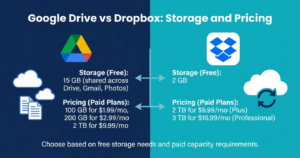
Storage capacity and pricing are major deciding factors for freelancers.
Google Drive Pricing
Google Drive offers 15 GB of free storage, which is significantly higher than Dropbox. This free storage is shared across Gmail, Google Photos, and Drive.
Paid plans include:
-
100 GB plan
-
200 GB plan
-
2 TB and higher storage options
Google Drive generally provides more affordable storage plans compared to Dropbox.
Dropbox Pricing
Dropbox offers only 2 GB of free storage, which is much smaller than Google Drive. However, its paid plans provide strong performance and business-focused features.
Paid plans include:
-
2 TB personal storage plan
-
Professional and business plans with advanced collaboration tools
Dropbox tends to be slightly more expensive but offers premium file management features.
File Sharing and Collaboration Features
Collaboration is extremely important for freelancers working with clients and teams.
Google Drive Collaboration
Google Drive is widely recognized for its real-time collaboration tools. Multiple users can edit documents simultaneously, leave comments, and track changes instantly.
Freelancers working on writing, research, marketing, or team projects often prefer Google Drive because it simplifies communication and reduces workflow delays.
Dropbox Collaboration
Dropbox also offers strong sharing features, but it focuses more on file storage and syncing rather than live editing. Dropbox Paper allows collaborative editing, but it is not as widely used as Google Docs.
Dropbox is better suited for freelancers who mainly share finished project files rather than working on documents together in real time.
Speed and Performance
Speed matters when uploading or downloading files, especially large media content.
Dropbox is known for faster file syncing and better performance when handling large files like videos, design projects, or software development assets.
Google Drive performs well for standard file sizes but may sometimes be slower when uploading very large files. However, for everyday document storage and sharing, the difference is usually minimal.
Security and Data Protection
Freelancers often handle sensitive client information, making security a top priority.
Google Drive Security
Google Drive provides strong encryption, two-factor authentication, and secure sharing permissions. It also benefits from Google’s advanced security infrastructure.
Dropbox Security
Dropbox also offers strong encryption, file recovery, and version history features. Dropbox allows freelancers to restore deleted files or revert to earlier versions, which is extremely useful for project management.
Both platforms provide reliable security, but Dropbox offers slightly better file recovery flexibility.
Ease of Use
Google Drive is extremely easy to use, especially for freelancers already using Gmail or other Google services. Its interface is clean and intuitive, making file management simple.
Dropbox is also user-friendly but focuses more on folder organization and file syncing. Many freelancers appreciate its straightforward design and reliability.
Integration With Other Tools
Freelancers often use multiple productivity tools, making integration important.
Google Drive integrates seamlessly with Google Workspace, including Gmail, Calendar, Docs, and Meet. This makes it a powerful solution for freelancers managing communication and collaboration in one place.
Dropbox integrates with many third-party applications like Slack, Zoom, Adobe Creative Cloud, and project management tools. This makes it especially attractive for creative freelancers.
Which Platform Is Better for Freelancers?
Choosing between Google Drive and Dropbox depends on your freelance workflow and priorities.
Google Drive Is Best For:
-
Writers and content creators
-
Freelancers working with documents and spreadsheets
-
Teams requiring real-time collaboration
-
Budget-conscious freelancers
-
Professionals already using Google Workspace
Dropbox Is Best For:
-
Designers and videographers
-
Freelancers handling large media files
-
Professionals needing fast file syncing
-
Users requiring advanced file recovery
-
Creative freelancers using Adobe tools
Can Freelancers Use Both?
Many freelancers use both Google Drive and Dropbox together. Google Drive is often used for collaboration and document management, while Dropbox is used for storing and sharing large project files.
Using both platforms can provide maximum flexibility and workflow efficiency.
Final Verdict: Google Drive vs Dropbox
Both Google Drive and Dropbox are excellent cloud storage solutions for freelancers. Google Drive stands out for collaboration, affordability, and seamless integration with Google services. Dropbox excels in speed, reliability, and advanced file management.
Freelancers who focus on teamwork and document-based projects will likely benefit more from Google Drive. Those working with high-quality media files or creative assets may find Dropbox more suitable.
Ultimately, the best choice depends on your freelance business needs, workflow style, and budget. Testing both platforms can help you determine which one improves your productivity and client collaboration.