Managing clients as a freelancer can quickly become overwhelming. Between handling multiple projects, tracking tasks, communicating with clients, sending invoices, and meeting deadlines, things can spiral out of control without the right system.
This is where client management software becomes essential.
In this guide, you’ll learn how freelancers manage clients using software, step by step, using ClickUp as a practical example. This article is written for beginners and solo freelancers who want a simple, scalable, and professional way to manage their work.
Why Freelancers Need Client Management Software
Many freelancers start by managing clients using:
WhatsApp messages
Email threads
Notes apps
Spreadsheets
This works at first, but it fails as soon as you have more than 2–3 clients.
Client management software helps freelancers:
Stay organized
Meet deadlines consistently
Communicate professionally
Track work progress
Avoid missed payments
Instead of juggling tools, freelancers use one central platform to manage everything.
What Is Client Management Software?
Client management software allows freelancers to:
Create separate projects for each client
Assign tasks and deadlines
Track progress in real time
Store files and client details
Communicate clearly
Tools like ClickUp, Trello, and Notion are popular choices, but ClickUp stands out because it combines task management, communication, and project tracking in one place.
Step 1: Onboard Clients Using ClickUp
The first step in managing clients digitally is client onboarding.
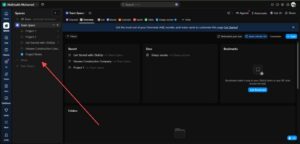
In ClickUp, freelancers typically:
Create one project or space per client
Add basic client details
Define project goals and deliverables
This creates a clean separation between clients and avoids confusion.
Step 2: Organize Projects and Tasks
Once the client is onboarded, the next step is organizing work.
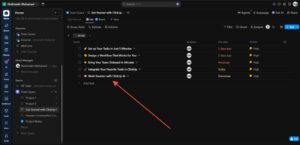
Freelancers use ClickUp to:
Break projects into tasks
Set deadlines (due dates)
Assign task priorities
Group tasks by status (Planning, In Progress, Completed)
This makes large projects manageable and transparent.
Instead of guessing what to work on next, ClickUp shows everything clearly.
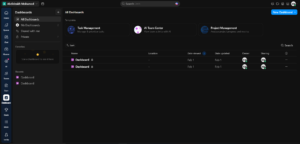
Step 3: Track Progress in Real Time
Tracking progress is one of the biggest challenges freelancers face.
With ClickUp, freelancers can:
See task progress instantly
Update task status with one click
Identify delays early
Stay accountable to deadlines
This is especially useful when managing multiple clients at the same time.
Progress tracking also improves professionalism and builds client trust.
Step 4: Communicate Clearly With Clients
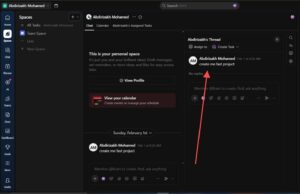
Clear communication is critical for client satisfaction.
Instead of scattered emails and messages, freelancers can:
Use task comments
Leave updates inside projects
Keep all conversations linked to tasks
This avoids misunderstandings and keeps communication documented.
Clients also appreciate structured updates rather than random messages.
Step 5: Manage Multiple Clients Efficiently
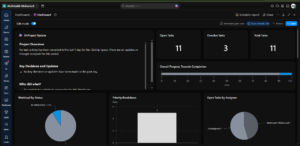
As freelancers grow, managing multiple clients becomes harder.
ClickUp solves this by allowing:
Separate projects for each client
Filters to view tasks by client
Dashboards to see all work at once
This helps freelancers avoid mixing tasks or missing deadlines.
Efficiency improves without adding stress.
Step 6: Store Client Files Securely
Freelancers handle many files:
Contracts
Design files
Documents
Reports
ClickUp allows file attachments directly inside tasks.
This means:
No lost files
Easy access anytime
Secure storage
Everything related to a client stays in one place.
Step 7: Stay Professional and Organized
Professionalism is not just about skill—it’s about organization.
Using software like ClickUp helps freelancers:
Meet deadlines
Deliver consistent quality
Respond faster
Look more reliable
Clients are more likely to return and recommend freelancers who are organized.
Why ClickUp Is a Top Choice for Freelancers
ClickUp is especially popular among freelancers because:
It has a free plan
It combines multiple tools into one
It works for solo freelancers and teams
It scales as your business grows
This makes it a smart long-term solution for client management.
Final Thoughts
Managing clients doesn’t have to be stressful.
By using client management software like ClickUp, freelancers can:
Stay organized
Save time
Reduce mistakes
Improve client satisfaction
Whether you are a beginner or an experienced freelancer, using the right tools makes a significant difference.
If you want to manage clients professionally, digitally, and efficiently, ClickUp is one of the best software tools available today
Common Mistakes Freelancers Make When Managing Clients
Even when freelancers start using software, many still struggle because they use the tools incorrectly. Avoiding common mistakes can dramatically improve productivity and client satisfaction.
1. Not Setting Clear Project Structures
Some freelancers create tasks randomly without organizing them into folders or lists. This quickly leads to confusion.
A better approach is:
Create one project per client
Create lists based on project phases
Add tasks inside those lists
This structure keeps everything predictable and easy to navigate
2. Ignoring Deadlines and Task Priorities
Deadlines are essential in freelancing. Missing deadlines damages trust and can result in losing clients.
ClickUp allows freelancers to:
Set due dates
Mark priority levels
Receive deadline reminders
This reduces last-minute stress and improves work quality.
3. Mixing Client Communication Across Platforms
Many freelancers communicate with clients through WhatsApp, email, and social media simultaneously. This creates confusion and lost information.
Using ClickUp comments and task updates keeps communication:
Organized
Trackable
Easy to review later
How Client Management Software Saves Freelancers Time
Time is one of the most valuable resources for freelancers. Managing clients manually wastes hours every week.
Client management software automates several tasks:
Automated Task Tracking
Freelancers don’t need to manually track progress. The system updates automatically when tasks are completed.
Faster Project Updates
Instead of writing long update emails, freelancers can update task statuses and clients can see progress instantly.
Centralized Information
All client details, files, and tasks remain in one place. This eliminates time wasted searching through emails or folders.
How Using Software Improves Client Relationships
Freelancers often focus only on delivering work, but client experience is equally important.
Using ClickUp helps freelancers create better client relationships by:
Delivering projects on time
Providing clear progress updates
Keeping communication professional
Responding faster to requests
Clients prefer freelancers who are reliable and organized, not just skilled
How Freelancers Scale Their Business Using Software
Freelancers who manage clients manually often struggle to grow. They reach a limit where handling more clients becomes impossible.
Software like ClickUp allows freelancers to scale by:
Handling multiple clients simultaneously
Creating reusable task templates
Tracking workload efficiently
Collaborating with team members when needed
This transforms freelancing from a side hustle into a structured business.
ClickUp Features That Freelancers Should Use
While ClickUp offers many features, freelancers should focus on the most useful ones first.
Task Management
This is the core feature. Freelancers can create tasks, assign deadlines, and monitor progress.
Time Tracking
Freelancers can track how long tasks take, helping with accurate pricing and productivity improvement.
Custom Status Workflows
Freelancers can create statuses like:
Planning
In Progress
Review
Completed
This improves workflow clarity
File Storage and Attachments
Freelancers can attach:
Client contracts
Project documents
Design drafts
Reports
Keeping files inside tasks prevents losing important documents.
Is ClickUp Suitable for Beginner Freelancers?
Yes, ClickUp is beginner-friendly, especially because it offers a free plan. New freelancers can start small and gradually learn advanced features.
Beginners should:
Start with one client project
Create simple task lists
Use deadlines and comments
Gradually explore dashboards and automation
Learning slowly prevents overwhelm.
Comparing Manual Client Management vs Software Management
Manual Method
Hard to track deadlines
Communication scattered
High risk of mistakes
Difficult to scale
Software Method
Organized workflow
Clear communication
Automated tracking
Easy business growth
This is why most professional freelancers rely on project management software.
Security and Data Protection Benefits
Freelancers often handle confidential client information. Using professional software improves data security.
ClickUp provides:
Secure cloud storage
Controlled access permissions
Backup protection
Organized document storage
This helps freelancers protect client data and maintain professionalism
Tips for Getting Started With ClickUp Successfully
If you are new to client management software, follow these practical tips:
Start simple and avoid adding too many features
Use templates to save time
Review tasks daily
Keep all client communication inside the platform
Update task progress regularly
Consistency is more important than complexity.
The Future of Freelance Client Management
Freelancing is becoming more competitive every year. Clients expect faster delivery, better communication, and professional project tracking.
Freelancers who use modern software tools gain a strong advantage because they:
Work faster
Stay organized
Deliver higher quality results
Build long-term client relationships
Client management software is no longer optional—it is becoming a standard requirement in the freelancing industry.
Conclusion
Managing freelance clients successfully requires organization, communication, and efficient project tracking. Without proper systems, freelancers risk missed deadlines, lost files, and unhappy clients.
Using client management software like ClickUp allows freelancers to manage projects professionally, track progress easily, and scale their business confidently.
Whether you are a beginner freelancer or an experienced professional, adopting software tools can dramatically improve productivity and client satisfaction. By following the step-by-step approach explained in this guide, freelancers can create a structured, efficient, and reliable client management workflow.